Skills, Connectors, and MCP: A Kitchen Analogy
Most people use AI the same way they used Google five years ago. Type a question, get an answer, copy paste it somewhere else.
I was doing the same thing until recently. ChatGPT for drafting, Claude for research, maybe uploading a document here and there. It worked fine. But I kept hearing three terms come up in every AI conversation I was having: Skills, Connectors, and MCP.
They sounded technical. The kind of thing developers care about but marketers skip over.
Turns out they're not technical at all. And once I understood them, it completely changed how I think about what these tools can do.
The Kitchen Analogy
A simple analogy helped me make sense of all three layers. Here it is.
You're the Customer
You walk into a restaurant and order a meal. You don't need to know how the kitchen works. You don't need to know what equipment they have or how the gas line connects to the stove. You just tell the chef what you want.
In AI terms, you're the user. You open Claude or ChatGPT and type what you need. That's it.
The Chef is the AI
The chef is talented. Years of training. Can chop, season, plate, and cook from memory. Knows hundreds of recipes.
These are the AI's skills. The things it can do on its own, right out of the box, without connecting to anything external.
For Claude, skills include things like searching the web, writing content, analyzing data you paste in, generating code, creating documents, and reading files you upload. ChatGPT has a similar set. These are built in from day one. No setup required.
Skills are powerful, but they have a limit. The chef can only work with what's already in front of them.
Appliances are Connectors
Even the best chef can't bake without an oven. Can't blend without a blender. Can't keep ingredients fresh without a fridge.
These appliances extend what the chef can do. Each one plugs into the kitchen and adds a specific capability that the chef didn't have on their own.
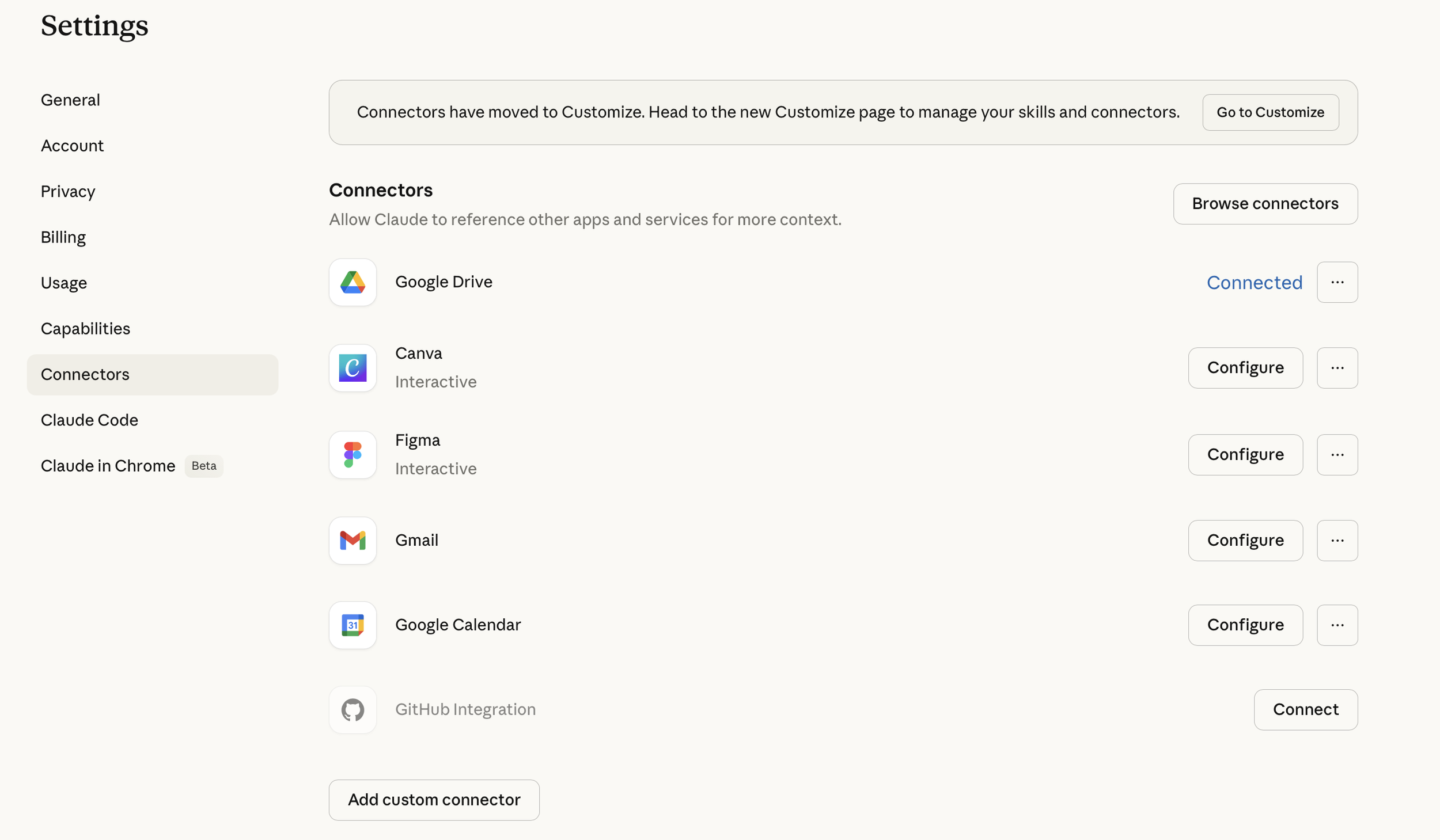
In AI terms, these are connectors. Each connector links the AI to a specific external tool you already use.
Some examples:
Gmail connector: Claude can search your inbox, read email threads, and draft replies.
Google Drive connector: Claude can find and read documents, spreadsheets, and presentations stored in your Drive.
Google Calendar connector: Claude can check your schedule, find conflicts, and create events.
Slack connector: Claude can search messages and send updates to channels.
CRM connectors (like HubSpot or Salesforce): Claude can pull contact data, check deal stages, and update records.
Each connector is like plugging a new appliance into the kitchen. The chef's skills stay the same, but what they can do expands dramatically.
The Electrical System is MCP
Now here's the part that ties it all together.
For all these appliances to work in the same kitchen, you need a standard electrical system. Same outlets. Same voltage. Same plugs. If every appliance needed its own custom wiring, you'd spend more time rewiring the kitchen than actually cooking.
That's what MCP is. Model Context Protocol. It's the universal standard, created by Anthropic and now supported across the industry, that lets any connector plug into any AI model using the same rules.
Before MCP, if you wanted Claude to talk to Gmail and Google Drive, someone would have to build two separate custom integrations. And if you wanted ChatGPT to do the same, someone would have to build two more. Every combination of AI model and external tool needed its own wiring.
MCP solves that. Build one connector using the MCP standard, and it works with any AI model that supports the protocol. One plug, any outlet.
Think of it like USB-C. Before USB-C, every phone had its own charger. Now one cable works across most devices. MCP does the same thing for AI connections.
The Full Picture
To bring the analogy together:
You = the customer placing the order
Skills = what the chef already knows how to do
Connectors = the appliances that extend what's possible
MCP = the electrical system that makes it all work together
Why This Matters
Right now, most people treat AI like a chef with no kitchen. They ask a question, get a text response, and then manually take that response to wherever it needs to go. Open Gmail, paste the draft. Open Google Sheets, enter the data. Open Slack, share the update.
But when you start plugging in connectors, the AI stops just answering and starts doing.
It's the difference between asking the chef "what should I make for dinner?" and the chef actually cooking dinner for you.
Trying It Myself
I wanted to test this, so I started with one connector. Gmail.
I connected Claude to my Gmail account. Took about 30 seconds. Then I asked it a question that it could only answer by actually going into my inbox:
"How many emails have I received from Alex Wissner-Gross Newsletter? And give me a summary of the very first one I ever received from them."
This was a deliberate test. Claude couldn't fake this by searching the web. The number of emails in my inbox and the content of the very first one are things only my Gmail account would know.
Here's what happened.
Claude searched my Gmail, paginated through the results, and counted 80 emails from "The Innermost Loop" newsletter spanning from December 18, 2025 to April 3, 2026. Then it went back to the very first email, opened it, and gave me a summary of what it covered.
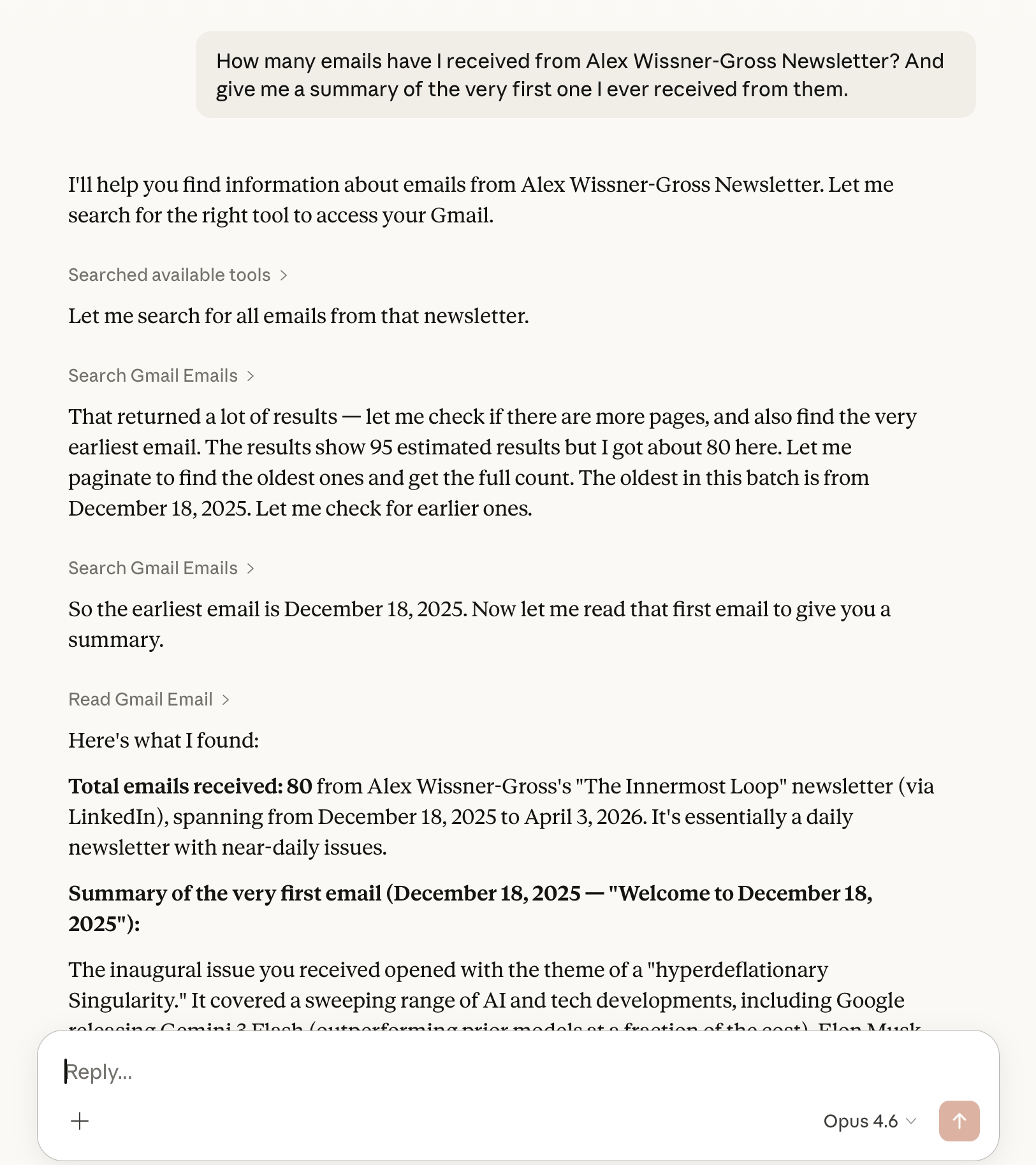
The whole thing took one conversation. No opening Gmail. No scrolling through months of emails. No searching. Claude went in, found exactly what I asked for, and came back with the answer.
One connector. One appliance plugged in.
One thing worth mentioning. These connectors use OAuth so your passwords are never shared directly. But anytime you're giving a tool access to your personal data, it's worth reading up on the security and privacy policies before connecting.
What's Next
This was just Gmail. One connector. One appliance in the kitchen.
But the real potential is in combining connectors. What happens when the chef has access to the oven, the blender, the fridge, and the pantry all at once?
In practical terms: what if Claude could search your Drive for a campaign performance report, analyze the data, draft a summary email, and send it through Gmail, all in one conversation?
I'm going to keep exploring this and share what I find. For now, if you haven't tried connectors yet, start with one. Gmail or Google Drive. It takes about 30 seconds to set up and it will change how you think about what these tools can actually do.
How to Get Started
If you're using Claude:
Click the + button on the lower left of your chat window
Click Connectors
Browse the available connectors (Gmail, Google Drive, Google Calendar, Slack, and more)
Click Connect on the one you want and follow the authentication steps
That's it. Once connected, you can start asking Claude to do things with that tool directly in your conversation.
If you're using ChatGPT, look for the equivalent integrations in the GPT settings or explore GPTs that connect to external tools.