Can a Marketer Recreate a SaaS Homepage Using Google Stitch?
The Context
Figma's stock dropped 9% last week. The cause? A free AI design tool from Google called Stitch.
Stitch lets anyone generate high-fidelity UI designs from a text prompt or image reference. No Figma skills required. No design background needed. Just describe what you want, and it builds it.
The hype online was loud. YouTube videos claiming you can build websites worth $10,000 in five minutes. The usual AI bro energy.
I wanted to cut through that and test it myself. As a marketer who has always relied on designers for anything visual, I was curious: could I actually produce something usable?
The Experiment
I decided to try recreating a real SaaS homepage using Google Stitch, following a structured workflow .
Reference site: I chose Scrunch, an AEO/GEO platform I've been tracking in the AI search visibility space. Clean design, modern layout, solid visual hierarchy. A good benchmark.
The workflow:
Step 1: Screenshot the reference site. I used a Chrome extension called GoFullPage to capture the entire Scrunch homepage as a single image. Before capturing, I scrolled through the full page to make sure all lazy-loaded images and animations had finished rendering.
Step 2: Generate a PRD. I uploaded the screenshot into ChatGPT and asked it to create a detailed Product Requirements Document covering design principles, layout structure, typography, color palette, UI components, and page structure. The output was thorough. It gave me hex codes, font recommendations, spacing rules, and component descriptions I could feed directly into Stitch.
Step 3: Feed both into Google Stitch. I pasted the full PRD text and uploaded the screenshot as a visual reference into Stitch. Hit generate.
Within minutes, Stitch created a design system (primary, secondary, tertiary colors, typography, corner radius, button styles) and generated an initial homepage layout.
Step 4: Iterate. The first output was generic. Safe colors, predictable layout, nothing that felt intentional. So I started adjusting. I opened the Design System panel and tweaked the color palette, changed the typography, and modified corner radius. Every change updated in real time across the design.
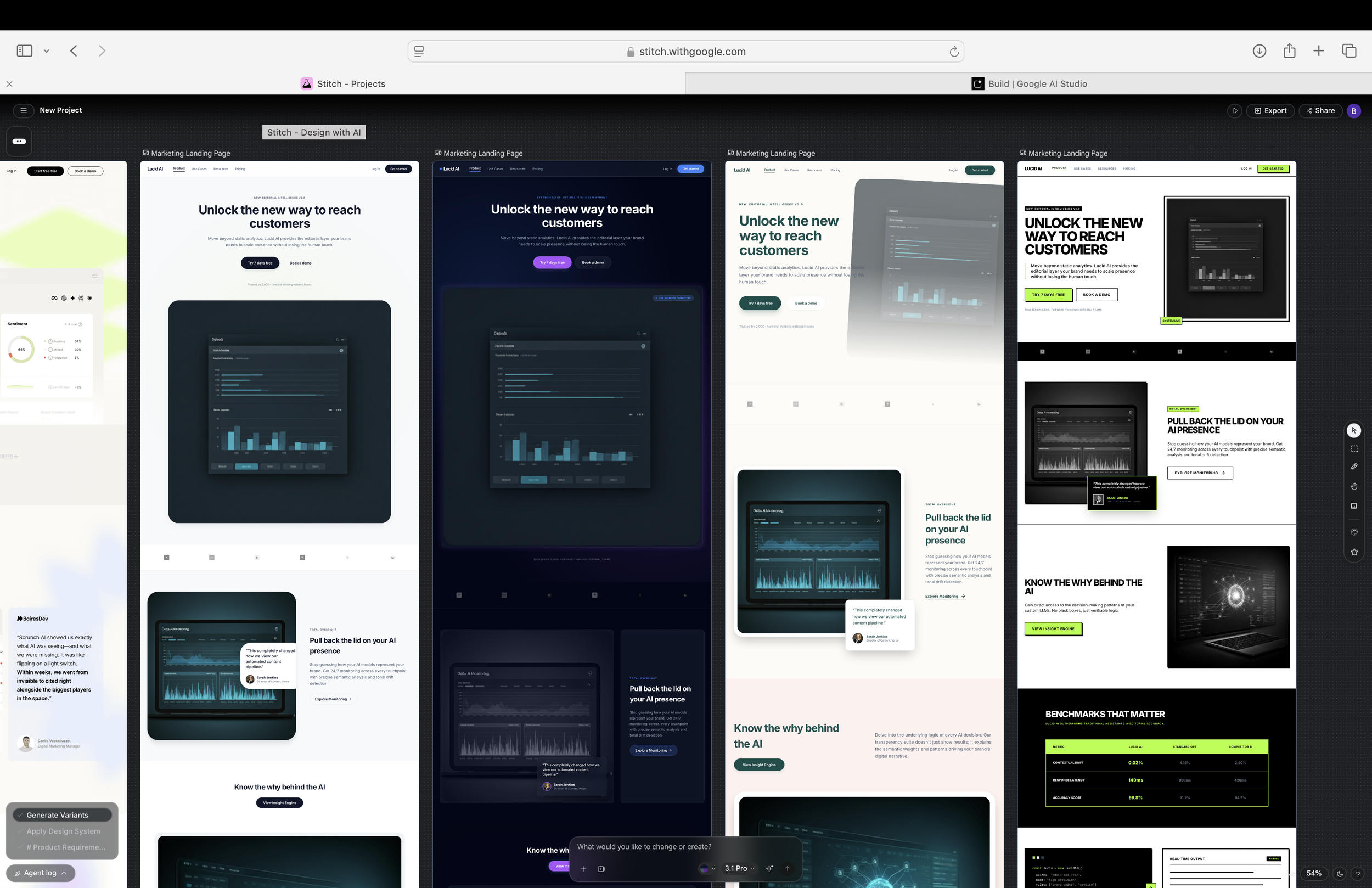
Then I generated variants. I asked Stitch to rework the layout and images while keeping the overall structure. Some came back solid. One completely broke. Typical AI inconsistency.
I also explored the Design.md tab, which is a markdown file that captures your entire style guide. This is actually one of the more useful features. You can take this file into Claude Code or any development environment and use it as a foundation for building out the actual site. It saves a lot of back-and-forth on design specs.
Step 5: Export to Google AI Studio. I wanted to see how far I could push the design, so I exported it to Google AI Studio to iterate faster. The HTML and Markdown design file took a while to load in Gemini. But once everything was in, changes happened in about 30 seconds. Update a heading, adjust spacing, swap an image, done. That speed made a real difference compared to waiting inside Stitch.
What I Observed
What worked well:
The PRD + screenshot combination gave Stitch a much better starting point than a plain text prompt would have. The design system feature is genuinely useful. Being able to adjust colours, fonts, and corner radius in one place and see it flow through the entire design is something I wouldn't have expected from a free tool. The Design.md export is a smart bridge between design and development. And the iteration speed inside AI Studio was noticeably faster than inside Stitch itself.
Where it fell short:
The initial output was underwhelming. Without heavy customization, the designs felt safe and generic. Variant generation was inconsistent. Out of three variants I generated, one was unusable. The tool is also slow at times, especially during busy periods, and the direct editing tools inside Stitch felt glitchy. And most importantly, the output still lacked the kind of visual hierarchy and brand feel that a trained designer would bring. Things looked assembled, not designed.
My Takeaway
This is not a tool that replaces designers. Not even close. The subtle decisions that make something look intentional rather than generated, that's still human territory.
But as someone who has always relied on designers to go from an idea to something visual, Stitch moved the starting line for me.
I went from a blank page to a working first draft in under an hour. Not a finished product. A starting point I could actually bring into a conversation instead of trying to describe what's in my head.
That feels like the real shift here. Not AI replacing designers. Just the gap between "I have an idea" and "here's something to work with" getting way smaller.
I'm going to keep exploring this. Different design styles, pushing the iterations further, maybe taking the output into Claude Code next. Lots more to test.
Tools Used
Google Stitch (stitch.withgoogle.com)
ChatGPT (for PRD generation)
Google AI Studio / Gemini (for faster iteration)
GoFullPage Chrome extension (for full-page screenshot)
Reference site: Scrunch (scrunch.com)
