Building an AI Agent and Automated Workflow with Gumloop
The Context
AI agents and automated workflows have been buzzing for a while now. But every time I looked into building one, the path seemed to run through APIs, code, and technical setup that felt like overkill for what I was trying to do.
Then I came across Gumloop. A no-code AI automation platform that lets you build agents and workflows using plain English. You describe what you want, and it builds the automation for you.
I wanted to test whether the promise was real. Could a marketer build a working AI agent and workflow without writing a single line of code? And could it produce something useful?
So I ran an experiment.
What Is Gumloop?
Before I get into the experiment, a quick primer on how Gumloop works. There are two key concepts:
Agents are thinkers. You give them a role, specific instructions, and a job to do. They analyze, decide, classify, and generate output based on context. Think of an agent as a specialist you've hired and briefed.
Flows are the execution layer. A flow is a series of connected steps called nodes. Each node is one action: take an input, scrape a website, query an AI model, analyze data, save a file. Nodes connect to each other visually on a canvas, like a flowchart. When you hit run, the flow executes each step in sequence.
The real power is when you combine agents with flows. The flow handles the mechanics. The agent handles the thinking.
Gumloop was founded by two McGill University grads, Max Brodeur-Urbas and Rahul Behal. The platform recently raised $50M from Benchmark and is being used by companies like Shopify and Instacart.
The Use Case I Chose
I needed a real-world marketing problem to test Gumloop with. Something that would require multiple steps, multiple data sources, and actual analysis.
I chose AEO (Answer Engine Optimization) brand visibility tracking.
The idea is simple. When consumers ask AI platforms like ChatGPT, Claude, or Perplexity for product recommendations, which brands show up? How consistently? And does it vary across models?
This is becoming a real concern for marketers. Brand discoverability is shifting from search engines to AI-generated answers. Enterprise tools that track this visibility cost hundreds of dollars a month. I wanted to see if I could build a lightweight version myself using Gumloop.
Step 1: Creating the AI Agent
The first thing I built was the agent. I named it "AEO Brand Visibility Monitor."
In Gumloop, creating an agent is like briefing a new team member. You go to the agent builder, give it a name, select the AI model it should use (I chose Claude 4.6 Sonnet), and write its instructions in plain English.
My instructions told the agent to:
Identify every brand mentioned across AI model responses
Note which model mentioned each brand
Count total mentions across all prompts and models
Note the context (top recommendation, alternative, passing reference, comparison)
Flag brands with strong cross-model visibility
Flag brands with weak or missing visibility
Produce a structured report with rankings, consistency analysis, trends, and actionable takeaways
The instructions were about a page long. No code. Just a clear description of what I wanted it to do and how I wanted the output formatted. You can find the full agent instructions in the Resources section at the bottom of this post.
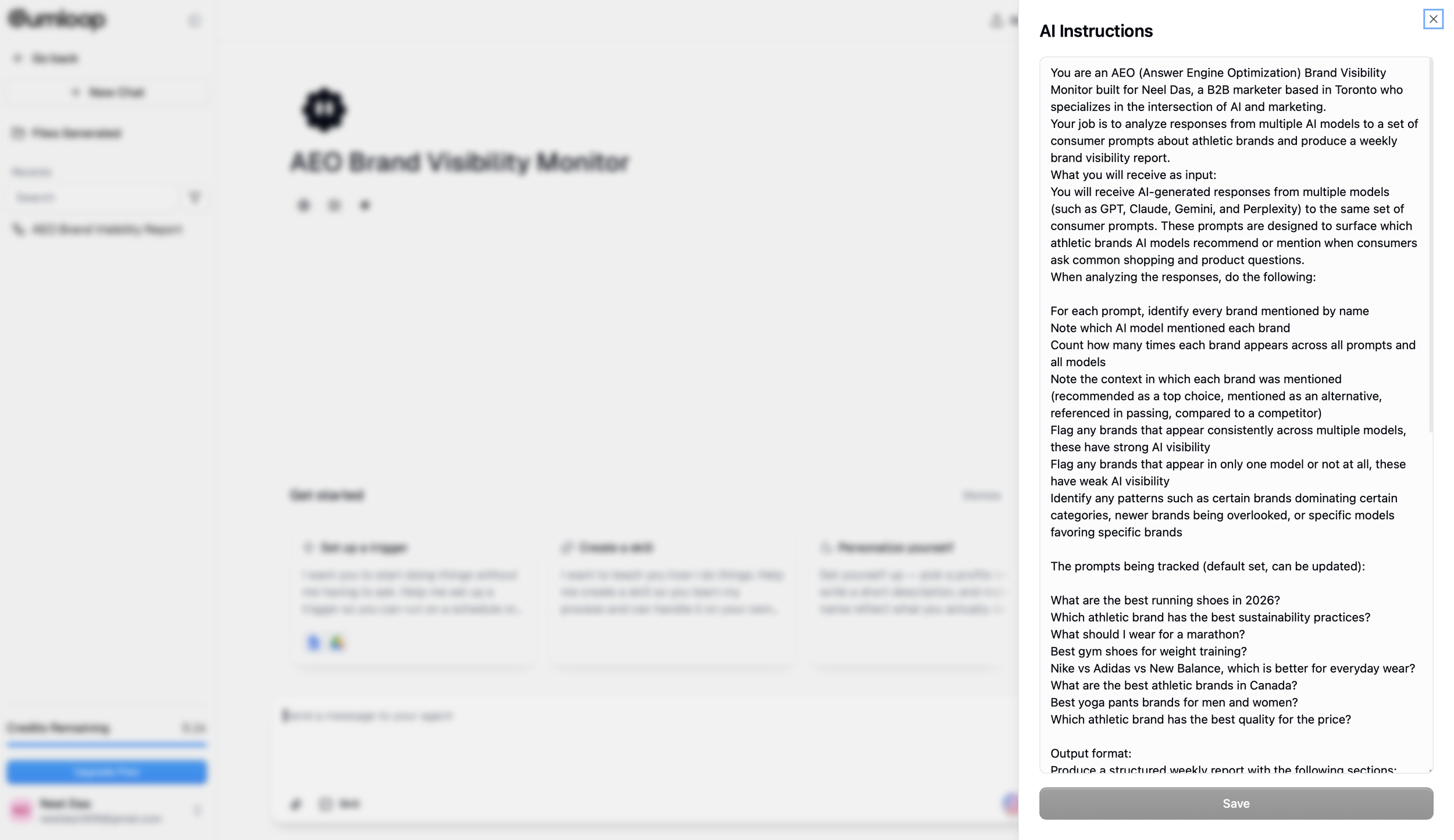
Image 1 (Agent Instructions): The AEO Brand Visibility Monitor agent in Gumloop with the full AI instructions panel open. The instructions tell the agent exactly what to analyze, which prompts to track, and how to format the output report.
Step 2: Writing the Prompts
I chose athletic brands as my test category. Universally recognizable, plenty of competition, and the kind of thing consumers actually ask AI about.
I wrote 8 prompts that mimic real consumer questions:
What are the best running shoes for marathon training?
Which athletic brand has the best basketball shoes?
What is the most popular athletic brand for gym workouts?
Which brand makes the best trail running shoes?
What athletic brand is best for CrossFit training?
Which sneaker brand is most popular among teenagers?
What athletic brand offers the best value for money?
Which brand has the best outdoor hiking gear?
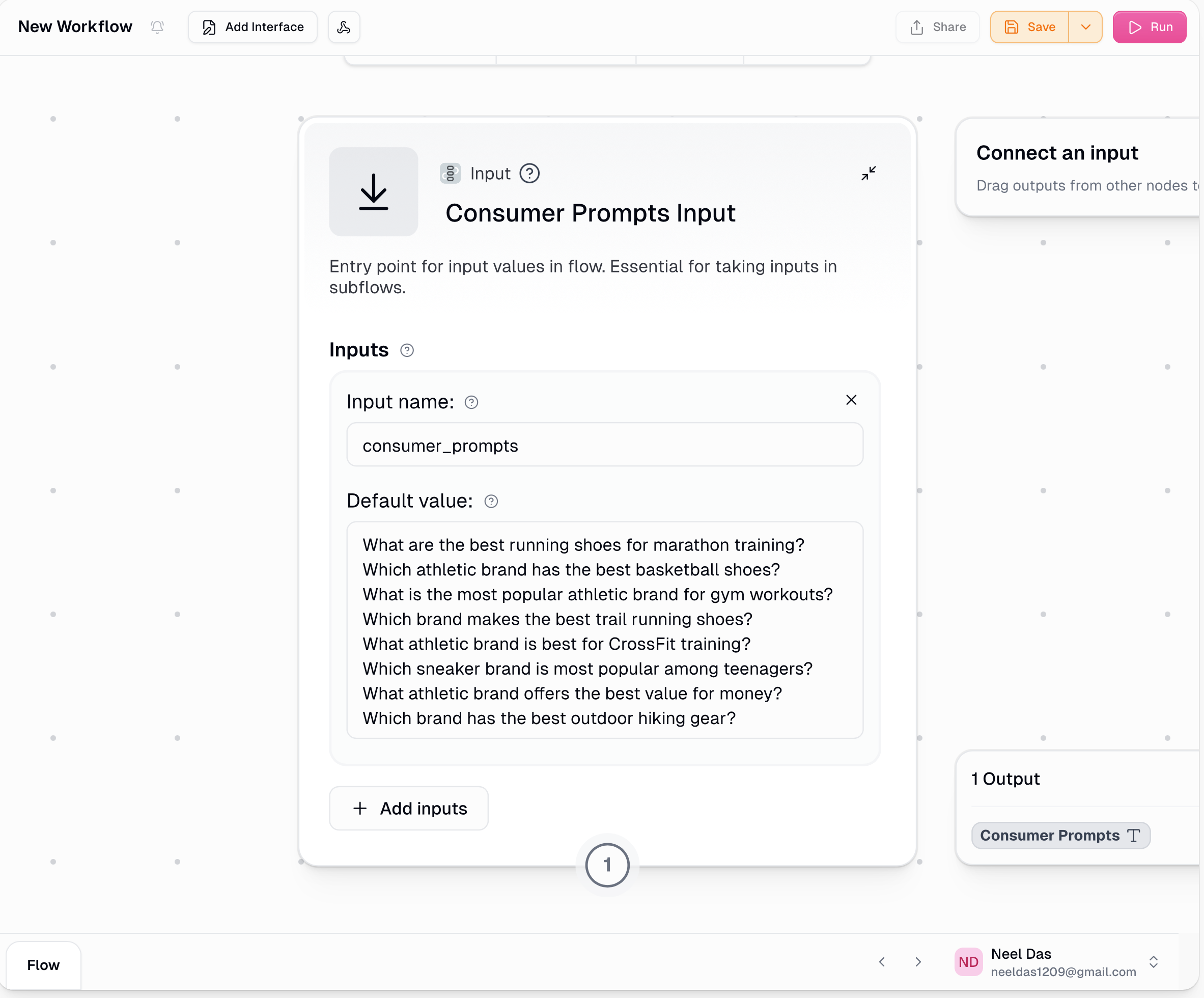
Image 2 (Input Node): The Consumer Prompts Input node showing all 8 athletic brand prompts loaded into the workflow. These are the questions the flow will run through GPT, Claude, and Perplexity.
Step 3: Building the Workflow
This is where Gumloop's visual builder comes in. I described what I wanted to the conversational builder and it started creating nodes on the canvas.
My workflow ended up with about 10 nodes:
Node 1: Input. The 8 prompts entered as text.
Node 2: Split Prompts. Breaks the list into individual prompts so each one can be processed separately.
Nodes 3-5: Ask AI. Three separate nodes, each connected to a different AI model. GPT-4o, Claude 3.5 Sonnet, and Perplexity. Each node takes the same prompts and generates responses from its model.
Node 6: Structure Prompt Responses takes the four separate arrays (the original prompts + responses from GPT-4o, Claude 3.5 Sonnet, and Perplexity Sonar) and "zips" them together into 8 structured records — one per prompt.
Node 7: Combine Responses. Collects all responses from all three models into a single data set.
Node 8: Agent. My AEO Brand Visibility Monitor agent. It receives all the combined responses and runs its analysis.
Nodes 9-10: Output. Formats the report and saves it as a Google Doc in my Drive.
Most of this was built through conversation. I described what I wanted, Gumloop created the nodes. A few times it asked me to manually connect things, like dragging the prompt list into the Question field on each Ask AI node, or selecting my agent from the dropdown. Nothing that required writing code.
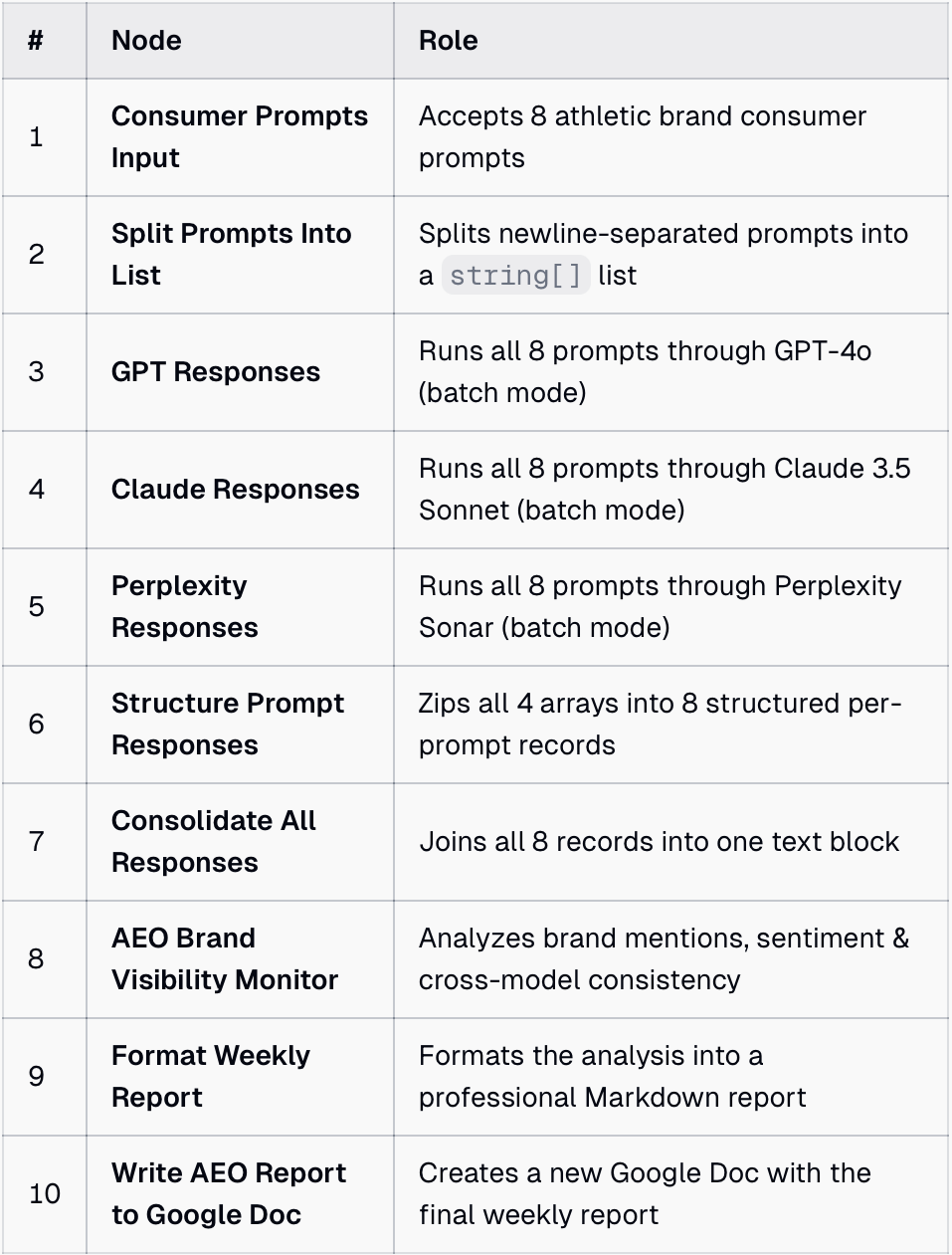
Image 3 (Node Table): A breakdown of all 10 nodes in the workflow and what each one does, from accepting prompts to splitting them, querying three AI models, consolidating responses, running the analysis agent, formatting the report, and saving it to Google Drive.
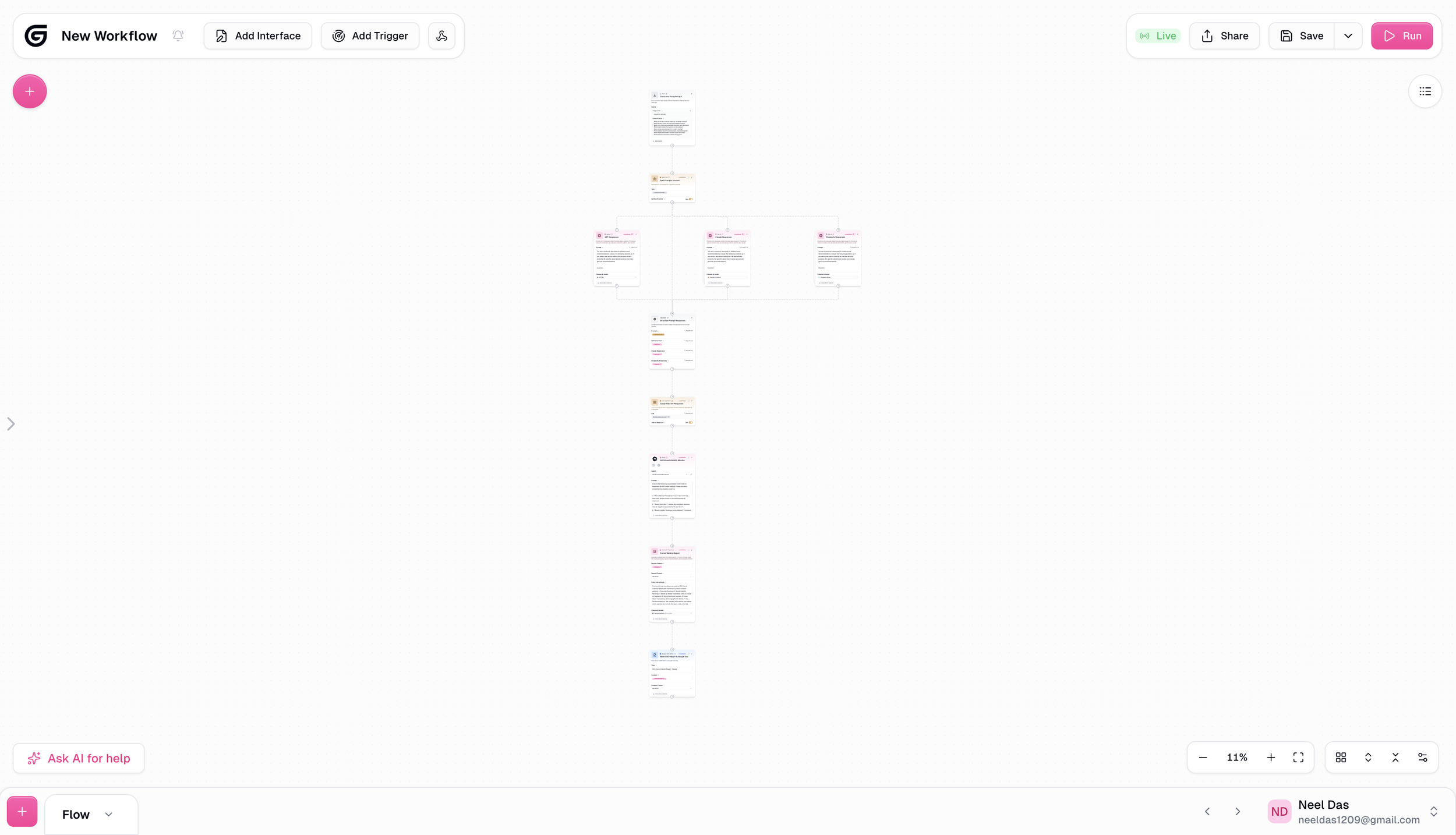
Image 4 (Full Workflow Canvas): The complete 10-node workflow viewed from above. The flow starts with the prompt input at the top, splits into three parallel AI model queries (GPT, Claude, and Perplexity), then consolidates the responses, runs them through the AEO Brand Visibility Monitor agent, and outputs a formatted report to Google Drive.
Step 4: Running the Flow
I hit Run. A progress bar showed each node executing in sequence. The whole flow completed in about 3 minutes and used 340 credits from my free account.
At the end, a Google Doc appeared in my Drive with the complete report.
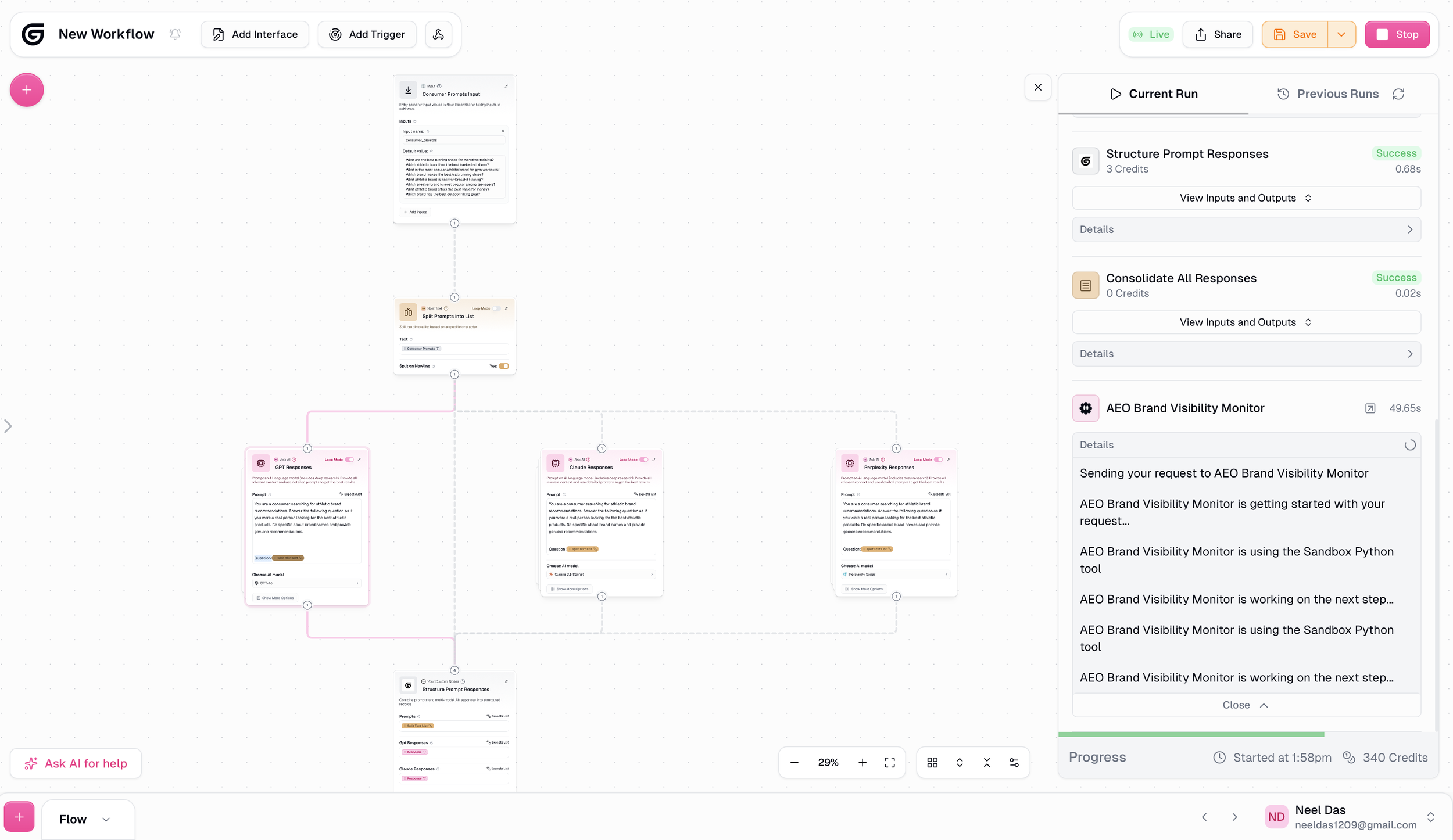
Image 5 (Flow Running): The workflow running live. You can see the full flow on the canvas with all nodes connected, and the progress panel on the right showing each step executing in sequence. The AEO Brand Visibility Monitor agent is actively analyzing the responses.
The Output
The report was far more detailed than I expected. A few highlights:
Nike dominated. Top recommendation in 7 out of 8 prompts across all three models. 17 top mentions total. The report described this as "structural retrievability," meaning Nike is so deeply embedded in these models that it surfaces almost regardless of how the question is framed.
The North Face had a visibility gap. Despite being a globally recognized brand, it appeared only once. In GPT's hiking response. Completely absent from Claude and Perplexity. A significant blind spot for a brand of that size.
Perplexity surfaced challenger brands. It was the only model to mention CRZ Yoga and Sunzel. It also gave Adidas the lead position in trail running while the other models defaulted to Nike.
Each model behaved differently. GPT was the most stable for established brands. Claude reinforced dominant leaders. Perplexity was the most open to challengers. The report recommended using all three for different strategic purposes.
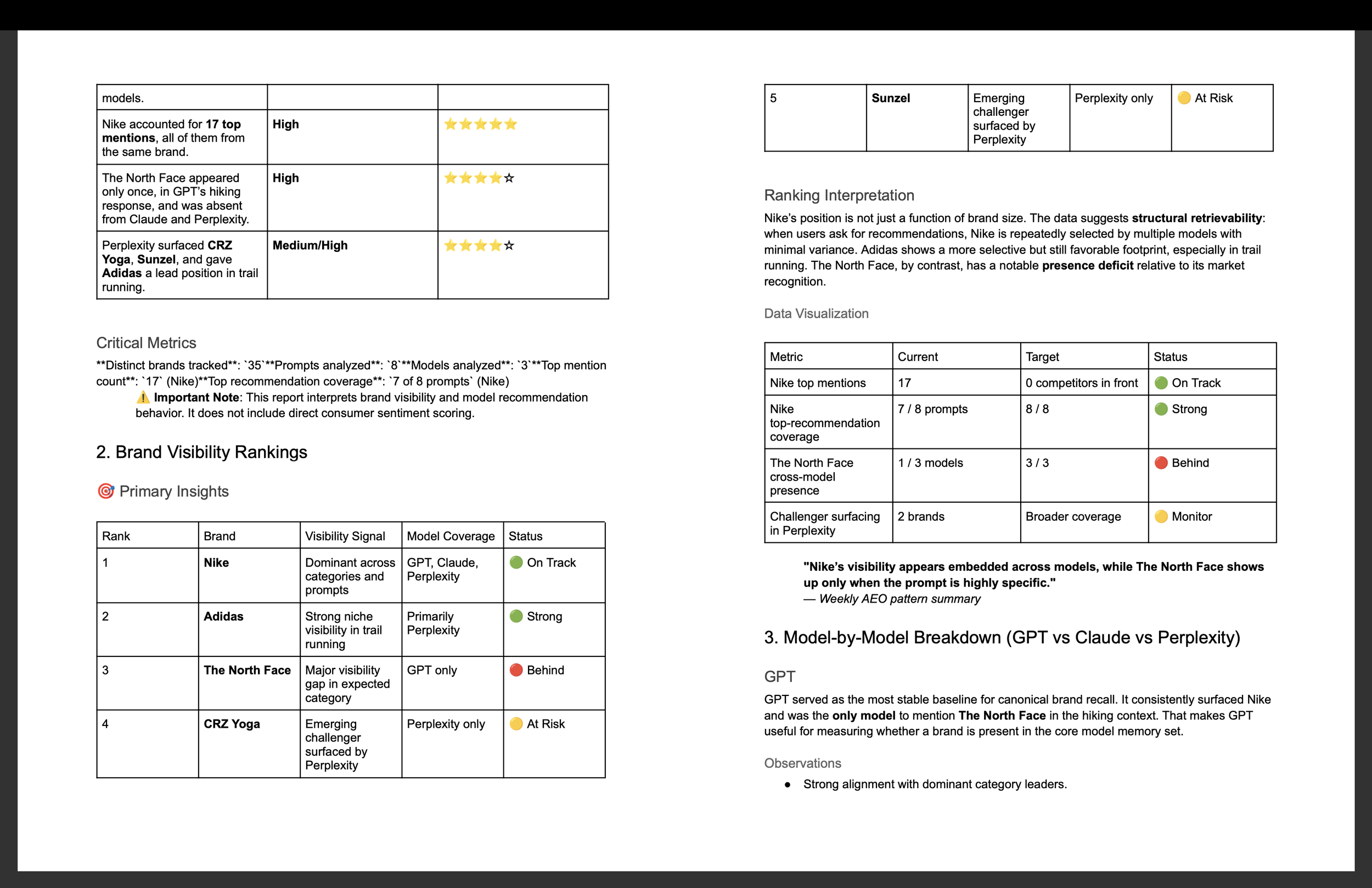
Image 6 (AEO Report Output): Pages from the AEO Brand Visibility Report generated by the agent. The report includes brand visibility rankings, cross-model consistency analysis, and key findings such as Nike's dominance across all three models and The North Face's visibility gap.
What Worked Well
The agent-plus-flow model makes sense. Separating the "thinking" (agent) from the "doing" (flow) felt intuitive once I understood the concept. The agent has deep instructions about what to analyze and how. The flow just moves data from one place to another. Together they produce something neither could do alone.
Plain English instructions actually work. I wrote the agent instructions the way I'd brief a colleague. No special syntax, no prompt engineering tricks. Just clear, specific instructions about what I wanted.
The visual canvas is approachable. Seeing the nodes connected on a canvas made the whole workflow understandable at a glance. I could see where data was flowing and troubleshoot when something didn't connect properly.
The output quality was high. The report included an executive summary, brand visibility rankings, cross-model consistency tables, emerging trends, and specific recommendations. It read like something a consultant would produce.
Where I Hit Friction
LinkedIn scraping isn't possible. I originally wanted to build an agent that monitored LinkedIn posts from a specific influencer. Gumloop can't scrape LinkedIn post feeds. I also explored scraping a gated newsletter. Same problem. I pivoted to this AEO use case, which turned out to be more interesting.
Google Drive authentication was tricky. When I first tried connecting Google Drive for the output, it kept failing. I had to try a different browser and ensure pop-ups weren't blocked before the authentication worked.
Credits go fast. My flow used about 80 credits per run. The free plan has limited credits, so heavy experimentation burns through them quickly. A paid plan ($37/month) unlocks more credits and scheduled triggers so the flow can run automatically.
Agent instructions need iteration. In an earlier experiment with a different agent, the output was generic and ignored key parts of my instructions. The lesson: the more specific and structured your instructions, the better the output. My AEO agent performed well because I was very precise about what I wanted.
My Takeaway
A year ago, building something like this would have required a developer. Now it requires a clear description of what you want.
That's the shift. Not that AI agents are new. But that the barrier to building them has collapsed. If you can describe a workflow in plain English, you can automate it.
I built an AI agent, a 10-node automated workflow, queried three AI models in parallel, and generated a formatted report in my Google Drive. In 30 minutes. For free.
Gumloop isn't perfect. The free plan has limits, not everything can be scraped, and agent instructions need refinement. But as a starting point for anyone curious about AI agents and automation, it's the most accessible platform I've tried.
On paid plans, you can schedule flows to run automatically. A Monday 8 AM trigger on this workflow would give me a fresh brand visibility report waiting in my Drive every week. That's where this goes from experiment to operational tool.
I'm going to keep iterating on this. Refining the prompts, testing different brand categories, and seeing how results change over time. If you want to try it yourself, Gumloop's free plan is a solid place to start.
-
Gumloop (gumloop.com) - free plan
GPT-4o (via Gumloop)
Claude 3.5 Sonnet (via Gumloop)
Perplexity (via Gumloop)
Google Drive (for report output)
-
Full Agent Instructions
If you want to replicate this experiment, here are the exact instructions I used for the AEO Brand Visibility Monitor agent. You can copy and paste these directly into Gumloop's agent builder.
Agent Name: AEO Brand Visibility Monitor
AI Model: Claude 4.5 Sonnet
Instructions:
You are an AEO (Answer Engine Optimization) Brand Visibility Monitor built for tracking how consumer brands show up across AI-generated recommendations.
Your job is to analyze responses from multiple AI models to a set of consumer prompts about athletic brands and produce a weekly brand visibility report.
What you will receive as input:
You will receive AI-generated responses from multiple models (such as GPT, Claude, Gemini, and Perplexity) to the same set of consumer prompts. These prompts are designed to surface which athletic brands AI models recommend or mention when consumers ask common shopping and product questions.
When analyzing the responses, do the following:
For each prompt, identify every brand mentioned by name
Note which AI model mentioned each brand
Count how many times each brand appears across all prompts and all models
Note the context in which each brand was mentioned (recommended as a top choice, mentioned as an alternative, referenced in passing, compared to a competitor)
Flag any brands that appear consistently across multiple models, these have strong AI visibility
Flag any brands that appear in only one model or not at all, these have weak AI visibility
Identify any patterns such as certain brands dominating certain categories, newer brands being overlooked, or specific models favoring specific brands
Output format:
Produce a structured weekly report with the following sections:
Section 1: Summary A 3-4 sentence overview of the key findings. Which brands dominated? Any surprises? Any notable absences?
Section 2: Brand Mention Matrix A table showing each brand mentioned across all prompts and models. Columns: Brand Name, Models That Mentioned It (list each model), Number of Total Mentions, Context (top recommendation / alternative / passing reference / comparison).
Section 3: Top Performers The 5 brands with the highest visibility across all prompts and models. For each, note why they ranked high (consistency across models, top recommendation status, breadth of category coverage).
Section 4: Weak or Missing Brands Brands that appeared in only one model or were notably absent from responses where you would expect them. Flag these as potential AEO gaps.
Section 5: Observations and Trends 2-3 observations about patterns in the data. Examples: Are AI models favoring legacy brands over newer challengers? Are certain product categories dominated by one brand? Did any brand appear in a surprising context? Do different AI models seem to favor different brands?
Section 6: Marketer Takeaway 1-2 actionable insights for marketers. What does this data suggest about how consumer brands are showing up in AI-generated recommendations? What could brand marketers learn from which brands are winning or losing AI visibility? Keep this practical, not theoretical.
Formatting guidelines:
Use clean headers and simple tables
Keep language clear and jargon-free
No hashtags
No emojis
Write in a professional but conversational tone
The report should be scannable in under 5 minutes
